
Securing AI agent behavior is a key customer challenge in building agentic solutions. As enterprises rapidly adopt AI agents to automate workflows, they face a scaling challenge in managing secure access to tools across the organization. Modern unified enterprise AI platforms have hundreds of agents serving users across the organization. These agents need to access thousands of Model Context Protocol (MCP) tools spanning different teams, organizations, and business units. The scale of these platforms creates a fundamental governance problem. Traditional applications execute fixed logic. Agents powered by a large language model (LLM) decide at runtime which tools to invoke, with what arguments, and in what sequence. Because of the dynamic nature of this workflow, auditing the call graph in advance becomes a problem. You must build mechanisms for an LLM so that it behaves the way you intend.
You can use Amazon Bedrock AgentCore gateway to secure agents and tools through two complementary mechanisms: Policy in Amazon Bedrock AgentCore for deterministic access control and interceptors for AgentCore gateway for dynamic validation. Policy in Amazon Bedrock AgentCore lets you define policies on tools attached to your Gateway. Policies are authored in Cedar, a declarative policy language that evaluates each request against a principal , an action , and a resource , with optional conditions over request context. The result is a deterministic allow or deny decision, automatically recorded in the audit log. Lambda interceptors let you define custom code that runs before or after each tool call, supporting dynamic validation, payload enrichment, token exchange, and response filtering. You can combine both mechanisms to build a layered security architecture for your agentic solutions.
In this post, we use a lakehouse data agent to demonstrate how you can use Policy for deterministic access control and Lambda interceptors for dynamic validation. We then show how to combine Lambda interceptors and Policy to implement a geography-based access control which requires both dynamic validation and deterministic access control.
Prerequisites
Before implementing this solution, you need:
Solution overview
The lakehouse data agent is an AI assistant that lets insurance company employees query claims data. The data is stored in Amazon S3 Tables (Apache Iceberg) and queried through Amazon Athena and AWS Lake Formation . Three user roles exist in the application: policyholders (who can only view their own claims), adjusters (who manage assigned claims), and administrators (who have full data access including audit logs). A Streamlit UI authenticates users through Amazon Cognito and passes JSON Web Tokens (JWT) to the agent.
The MCP Server exposes five tools:
query_claims
,
get_claim_details
,
get_claims_summary
,
query_login_audit
, and
text_to_sql
. Role-to-tool access, tenant IAM role mappings, and user
geography
are stored in Amazon DynamoDB. AWS Lake Formation enforces row-level and column-level security at query time. In this case, even if an agent constructs a broad SQL query, the results are automatically scoped to what the caller’s IAM role is permitted to see.
The following diagram shows the architecture for the lakehouse data agent:
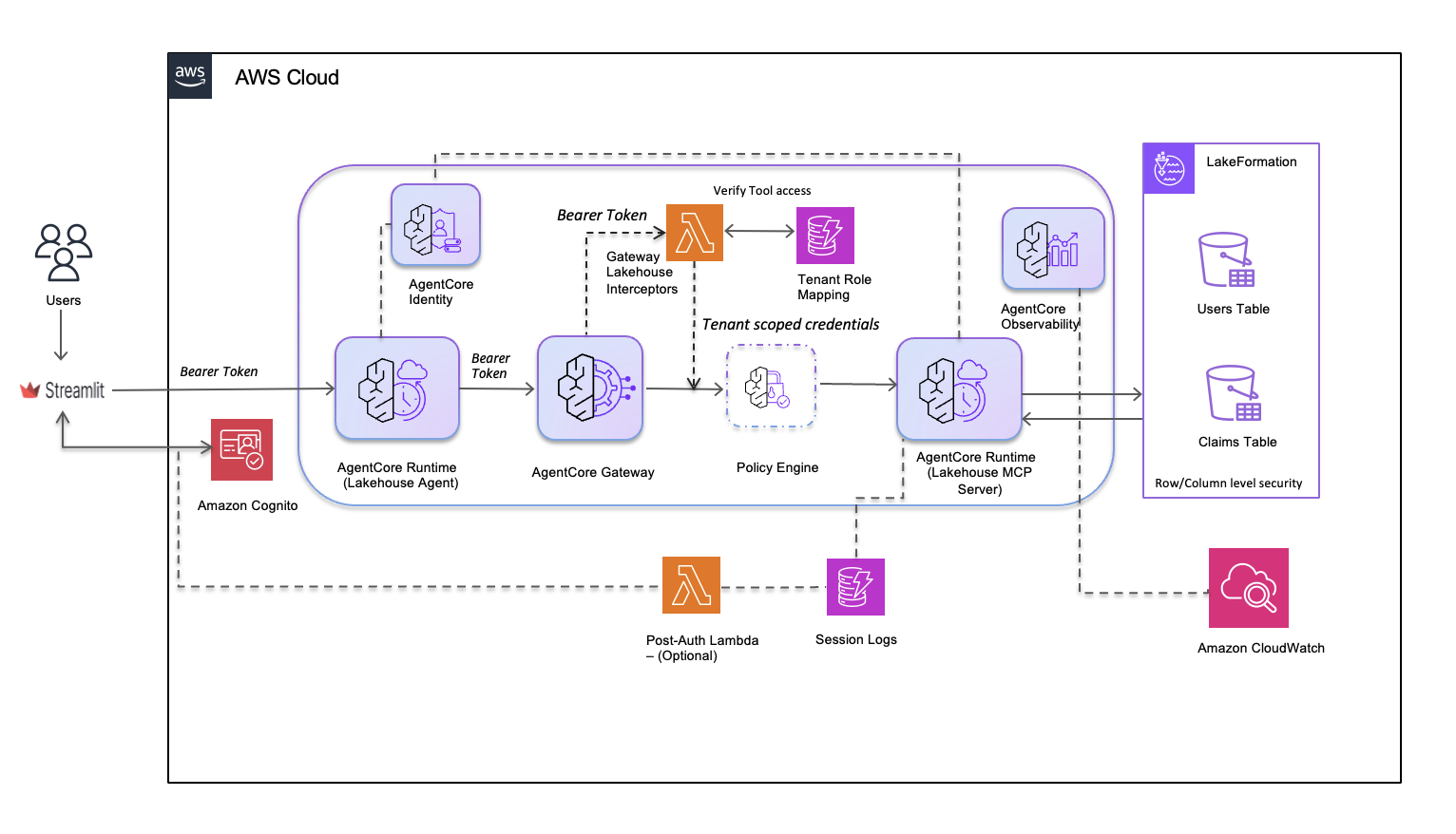
Users access the lakehouse agent through a Streamlit UI, where Amazon Cognito authenticates them and issues bearer tokens. AgentCore Runtime hosts the lakehouse agent, validates these tokens, and establishes isolated sessions for each user. When the agent invokes tools, AgentCore Gateway routes requests through a Lambda Interceptor. The Interceptor extracts the bearer token, validates tool access through Tenant Role Mapping, and generates a token with tenant-scoped claims. The AgentCore Policy Engine evaluates each tool call against defined policies before permitting access. The lakehouse MCP Server then queries data using the scoped credentials. AWS Lake Formation enforces row-level and column-level security based on the Users Table and Claims Table, helping each user see only the data they are authorized to access. AgentCore Observability and Session Logs stream to Amazon CloudWatch for real-time monitoring and compliance auditing.
Request flow
The following diagram shows the tool call flow through the solution:
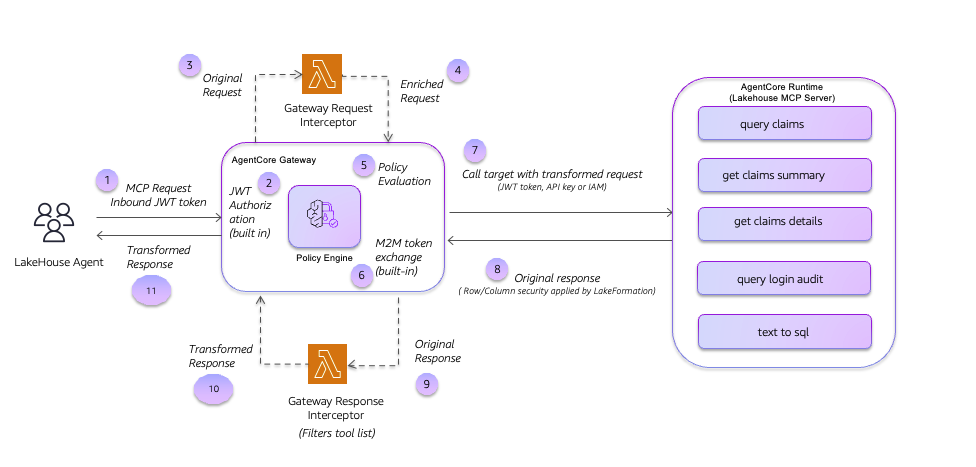
When the lakehouse agent initiates a tool call through the AgentCore Gateway, the request is intercepted by the Request Interceptor Lambda function. The Request Interceptor transforms the request by replacing the bearer token with tenant-scoped credentials and injects additional context. The Policy Engine then evaluates the transformed request based on the Cedar policy. The transformed request is used to invoke the tool using the lakehouse MCP Server. The response is then evaluated by the Response Interceptor Lambda function, which filters the tool list before the response is returned to the user.
The Gateway evaluates the request interceptor before the Cedar policy. This order is fundamental to the design patterns where you would use the interceptor to enrich the request context before using policy to evaluate that enriched context.
Policy enforcement in AgentCore Gateway
Policy in Amazon Bedrock AgentCore uses the Cedar policy language to enforce deterministic, auditable access control at the Gateway. Cedar policy is expressed as
permit
or
forbid
rules evaluated over a principal, an action, and a resource, with conditions based on the context of the action.
We use Cedar policies for fine-grained access control when the authorization rules can be expressed as a logical condition over identity attributes, action identifiers, and request context. Typical use cases include restricting which tools a role can invoke and blocking access to sensitive operations for certain user groups. Cedar also enforces data-residency rules based on context attributes injected by an interceptor, and supports scope-checking or time-window enforcement at the gateway before requests reach downstream services.
Design 1: Policy only
First, let’s look at an example of a policy acting as a security layer for the lakehouse agent. Consider the scenario where the business decides that policyholders should not be able to call
get_claims_summary
. Policyholders can view their own individual claims, but the aggregate summary is reserved for adjusters and administrators. To do this, you can
attach a Policy Engine to the Gateway
and define two Cedar policies that work together: a baseline
permit
rule and a targeted
forbid
rule.
When a Policy Engine is attached to a Gateway, it follows deny-by-default semantics. If no policy explicitly permits a request, it is denied. Therefore, you first need a baseline
permit
policy that allows the agent to invoke tools on the Gateway:
permit(
    principal,
    action,
    resource == AgentCore::Gateway::"<gateway_arn>"
);
With this policy alone, all authenticated users can invoke any tool.
Next, add a
forbid
rule to carve out the specific restriction for policyholders. Because
forbid
rules take precedence over
permit
rules in Cedar, this single rule is sufficient to block the targeted tool invocation while leaving all other access intact.
forbid(
    principal is AgentCore::OAuthUser,
    action == AgentCore::Action::"lakehouse-mcp-target___get_claims_summary",
    resource == AgentCore::Gateway::"<gateway_arn>"
) when {
    principal.hasTag("cognito:groups") &&
    principal.getTag("cognito:groups") like "*policyholders*"
};
The combination of these two policies allows the agent to invoke any tool, except when policyholders attempt to access the claims summary.
Note:
A best practice is to begin with the policy enforcement mode on the policy engine set to
LOG_ONLY
. All policy decisions are written to CloudWatch, but no requests are blocked. This lets you validate that every policy rule behaves as expected before switching to
ENFORCE
mode.
The following diagram shows the tool call flow following the policy only pattern:
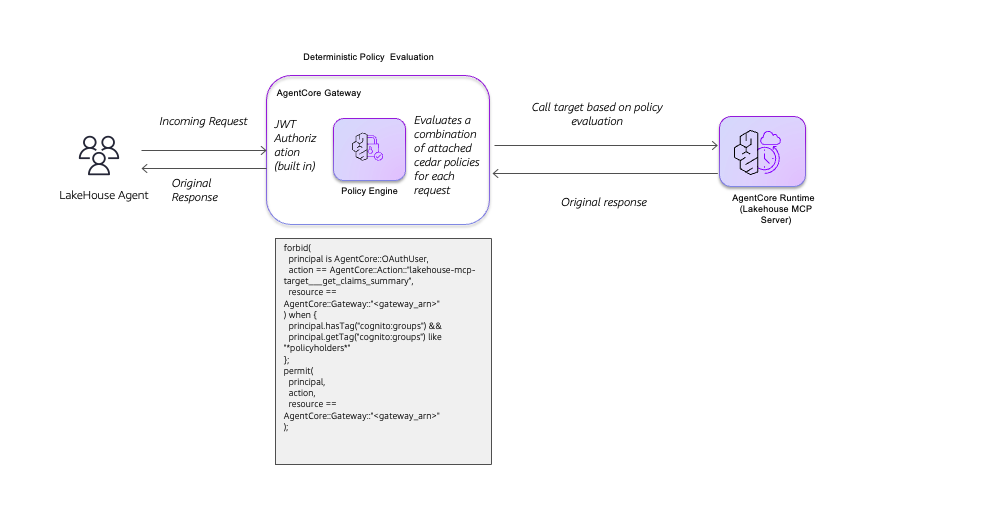
When the lakehouse agent sends an incoming request, AgentCore Gateway first validates the JWT token using built-in authorization. The Policy Engine then evaluates the request against a combination of attached Cedar policies. In this example, the Cedar policy uses a forbid-permit pattern. It first forbids access to the
get_claims_summary
tool for OAuth users, then permits access only when the principal has a Cognito group tag matching
policyholders
. This deterministic policy evaluation makes sure that only users belonging to authorized groups can invoke specific tools. Based on the policy evaluation result, the Gateway either permits the call to the lakehouse MCP Server and returns the original response to the agent, or denies the request before it reaches the tool.
Policy evaluation results for Design 1
| User | Tool | Expected result | Decision owner |
| policyholder001 | query_claims | Allow | Policy: permit matches |
| policyholder001 | get_claim_details | Allow | Policy: permit matches |
| policyholder001 | get_claims_summary | DENY | Policy: forbid overrides |
| adjuster001 | get_claims_summary | Allow | Policy: no forbid match |
Benefits of policy-based enforcement
Cedar policies provide three key benefits for securing AI agents:
- They are deterministic. The same inputs always produce the same decision regardless of LLM behavior.
- They are auditable. Once CloudWatch log delivery is enabled for the Gateway, every allow or deny decision is recorded with full context, providing a full audit trail.
- They add low latency. Cedar evaluation introduces minimal overhead to request processing.
Interceptors for dynamic control
Interceptors are custom Lambda functions that AgentCore Gateway invokes at two stages in the request lifecycle. A
REQUEST
interceptor runs before the request reaches the downstream tool, and a
RESPONSE
interceptor runs before the response is returned to the agent. The Gateway passes each interceptor a JSON event under the
mcp
key, containing the original request headers and body. The interceptor transforms the request content and returns it in the same structure. Interceptors work with all Gateway target types including Lambda functions, OpenAPI endpoints, and MCP servers. For the full payload contract and a detailed walkthrough, see
this post
.
When an agent invokes tools on behalf of the user, a critical security decision is how identity propagates through the call chain. The impersonation approach is to pass the original user JWT unchanged to each downstream service. This is simpler, but it also allows downstream services to receive more permissions than they need. A compromised service can then reuse the overly privileged token elsewhere (the
confused deputy problem
). An alternate approach is “act-on-behalf”, where each downstream target receives a separate, least-privileged token scoped specifically for that service. The user’s identity context flows through for auditing. Design 2 implements this pattern. The
REQUEST
interceptor exchanges the user’s Cognito JWT for short-lived, tenant-scoped IAM credentials through
sts:AssumeRole
, and those scoped credentials are what reaches the MCP Server.
Design 2: Interceptor only — act-on-behalf token exchange and context propagation
Three operations occur in the
REQUEST
interceptor that Cedar cannot perform:
- JWT-to-IAM token exchange (act-on-behalf). Read the user’s Cognito group from the JWT, look up the corresponding tenant IAM role in DynamoDB, and call
sts:AssumeRoleto obtain short-lived scoped credentials. - Context injection. Write user identity and the temporary IAM credentials into the MCP request body at
params.arguments.contextso the MCP Server can use them to construct scoped Athena clients. - Tool authorization. Check DynamoDB
allowed_toolsbefore forwarding the request, returning a structured MCP error for unauthorized calls.
The
REQUEST
interceptor handler (simplified):
def lambda_handler(event, context):
    # Parse the MCP gateway request from the interceptor event
    mcp_data = event.get('mcp', {})
    gateway_request = mcp_data.get('gatewayRequest', {})
    body = gateway_request.get('body', {})
    headers = gateway_request.get('headers', {})

    token = extract_bearer_token(headers)
    claims = validate_and_decode_jwt(token)  # Step 1: validate Cognito JWT

    # Step 2: check tool authorization against DynamoDB allowed_tools
    is_authorized, error_msg, tool_name = validate_tool_access(claims, body)
    if not is_authorized:
        return build_mcp_error_response(error_msg, status_code=403)

    # Step 3: act-on-behalf --- exchange JWT group claim for tenant IAM credentials
    claim_name, claim_value = get_claim_for_exchange(claims)
    tenant_credentials = exchange_jwt_to_iam(claim_name, claim_value)  # sts:AssumeRole

    # Step 4: inject user identity and scoped credentials into the MCP request body
    if 'params' in body and 'arguments' in body['params']:
        body['params']['arguments']['context'] = {
            'user_id': user_principal,
            'tenant_credentials': {
                'access_key_id': tenant_credentials['AccessKeyId'],
                'secret_access_key': tenant_credentials['SecretAccessKey'],
                'session_token': tenant_credentials['SessionToken'],
            }
        }

    # Return transformed request in the required interceptor output format
    return {
        'interceptorOutputVersion': '1.0',
        'mcp': {
            'transformedGatewayRequest': {
                'headers': transformed_headers,
                'body': body,
            }
        }
    }
The MCP Server receives the transformed request with the injected context. Each tool function accepts a context argument and uses it to construct a scoped Athena client. Lake Formation then applies row-level and column-level filters automatically at query time based on the tenant role’s permissions without a SQL WHERE clauses:
# server.py --- query_claims tool
def query_claims(claim_status=None, context=None):
    user_id, tenant_creds = get_user_id_with_fallback(context)

    # Athena client uses the tenant's scoped IAM credentials (not the user's JWT)
    # Lake Formation applies row-level and column-level filters automatically
    athena_client = boto3.client(
        'athena',
        aws_access_key_id=tenant_creds['access_key_id'],
        aws_secret_access_key=tenant_creds['secret_access_key'],
        aws_session_token=tenant_creds['session_token']
    )
    ...
Call flow for the Interceptor-only pattern
The following diagram shows the call flow for the Interceptor-only pattern:
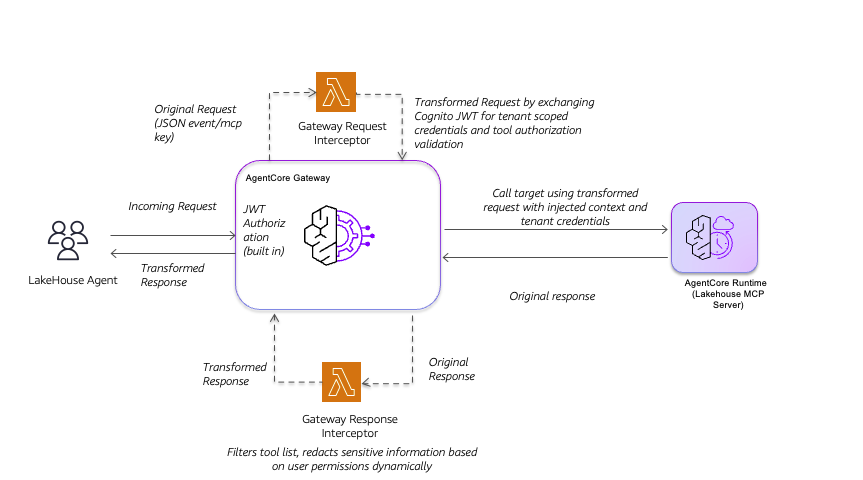
When the lakehouse agent sends an incoming request, AgentCore Gateway validates the JWT token and routes the original request as a JSON event with the
mcp
key to the Gateway Request Interceptor Lambda. This interceptor transforms the request by exchanging the Cognito JWT for tenant-scoped credentials and validating tool authorization. The Gateway then calls the lakehouse MCP Server using the transformed request with injected context and tenant credentials. When the MCP Server returns the original response, a Gateway Response Interceptor processes it before returning to the agent. This interceptor filters the tool list and redacts sensitive information dynamically based on user permissions, helping each user see only the tools and data they are authorized to access.
Dynamic tool filtering with the Response interceptor
A Response interceptor also gives you control over what the agent sees after a tool responds. The most common use is filtering the tools list and semantic search responses to show each user only the tools they are permitted to call. You can also integrate with services such as Amazon Bedrock Guardrails for use cases like personally identifiable information (PII) redaction. This improves security by hiding unauthorized tools from the agent and preventing sensitive information like PII from leaking. It also improves reliability by giving the LLM a smaller, correctly scoped tool list, reducing erroneous tool-selection decisions.
When to use Policy compared to Lambda interceptors
Policy and interceptors are not interchangeable. They serve different purposes in the security architecture. The following table summarizes the key decision criteria.
| Consideration | Use Policy | Use Lambda interceptor |
| Nature of the rule | Deterministic logical condition over known attributes | Requires external data or runtime computation |
| External lookups (DynamoDB, STS, APIs) | Not supported | Full access |
| Payload transformation | Not supported | Full read/write access to headers and body |
| Response modification | Not supported | RESPONSE interceptor |
| Latency impact | Negligible (<1 ms, on Cedar evaluation) | Lambda cold start + execution time |
| Auditability | Automatic per-decision CloudWatch logging | Lambda logs (manual instrumentation) |
| Emergency block | Add forbid rule through API, immediate effect | Lambda redeploy required |
| Rule change velocity | High: API call, no redeploy | Low: code change + redeploy |
| Evaluation order | After REQUEST interceptor | Before Cedar Policy |
| Token exchange / credential vending | Not supported | Full STS and secrets access |
| Semantic search filtering | Not supported | RESPONSE interceptor |
Use Policy when:
- You need a hard, auditable boundary that cannot be bypassed by the agent or the LLM.
- The authorization rule depends only on identity claims, action name, resource ARN, or context already present in the request.
- You need an emergency kill switch. A
forbidrule takes effect immediately through the control-plane API.
Use interceptors when:
- The rule requires data that must be fetched at runtime (DynamoDB, secrets, external authorization services).
- You need to transform or enrich the request payload before it reaches the tool.
- You need to filter or sanitize the tool response before it returns to the agent.
- The authorization decision is stateful — for example, token exchange or per-user rate limiting.
- You need to enforce authorization at the method level (
tools/callcompared totools/list) rather than at the tool level.
The design goal is composability. Use interceptors for everything that is inherently dynamic, and Cedar for everything that can be expressed as a logical rule over the enriched context. Because
REQUEST
interceptors run before Cedar, the two mechanisms form a natural pipeline rather than competing for the same responsibility.
Combining Policy and Lambda interceptors
When policies and interceptors operate together, each layer handles what it does best. The following diagram shows the call flow using the layered security with a combination of Policy and Lambda interceptors:
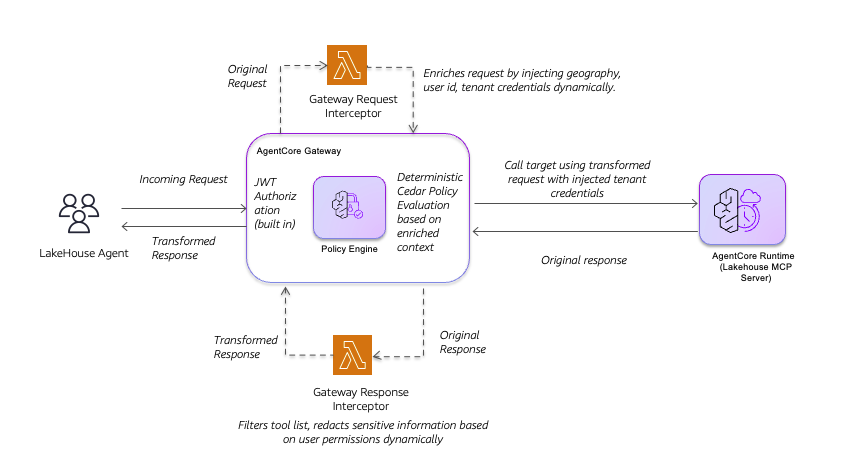
In this pattern, when the lakehouse agent sends an incoming request, AgentCore Gateway validates the JWT token and routes the original request to the Gateway Request Interceptor Lambda. This interceptor enriches the request by dynamically injecting
geography
,
user_id
, and tenant credentials. The Policy Engine then performs deterministic Cedar policy evaluation based on this enriched context, providing consistent access decisions. If permitted, the Gateway calls the lakehouse MCP Server using the transformed request with injected tenant credentials. When the MCP Server returns the original response, a Gateway Response Interceptor filters the tool list and redacts sensitive information dynamically based on user permissions before returning the transformed response to the agent.
The evaluation order is
REQUEST
interceptor before Cedar policy. With this composition, you can use the interceptor to fetch any data from any source and inject it into the request arguments, and use Cedar policies to evaluate the already-enriched request. We will see this again in the next design pattern.
Design 3: Policy + Interceptor — geography-based access control
This pattern addresses an example compliance requirement. We want to create a boundary that users operating from EU jurisdictions should not be able to access individual claim records, only aggregate summaries. This is a data-residency rule that combines a dynamic attribute (user
geography
stored in DynamoDB) with a deterministic policy rule (EU users may not call
query_claims
or
get_claim_details
).
Cedar cannot fetch
geography
from DynamoDB. The Lambda interceptor cannot express declarative
forbid
semantics with automatic audit logging. The combination of Policy and Lambda interceptor handles both by using the Lambda interceptor to fetch
geography
and enrich the request. Policy then uses this enriched request to evaluate the individual claim records based on user
geography
before passing the request to the target.
Step 1: Interceptor fetches geography and injects it into tool arguments
# interceptor-request/lambda_function.py

# Production: fetch geography from DynamoDB table 'lakehouse_user_geography'
# This demo uses an in-Lambda mapping for simplicity
USER_GEOGRAPHY: Dict[str, str] = {
    '[email protected]': 'US',
    '[email protected]': 'EU',
    '[email protected]': 'US',
    '[email protected]': 'US',
}

# After existing context injection, inject geography at the TOP LEVEL of arguments.
# Cedar evaluates it as context.input.geography.
# If placed inside context (params.arguments.context.geography),
# Cedar would need context.input.context.geography --- harder to express cleanly.
geography = USER_GEOGRAPHY.get(user_principal, 'UNKNOWN')
if 'params' in transformed_body and 'arguments' in transformed_body['params']:
    transformed_body['params']['arguments']['geography'] = geography

logger.info(f'Injected geography={geography} for user={user_principal}')
Key detail:
Cedar references tool arguments as
context.input.<field>
. Cedar can access any field regardless of nesting depth, but placing
geography
at the top level of
params.arguments
keeps the policy concise. It can then be referenced as
context.input.geography
instead of the more verbose
context.input.context.geography
if nested.
Step 2: Cedar policy evaluates the injected geography
// EU users cannot access individual claim records (GDPR data-residency requirement).
// The broad permit_all rule still allows EU users to call get_claims_summary.
forbid(
    principal,
    action in [
        AgentCore::Action::"lakehouse-mcp-target___query_claims",
        AgentCore::Action::"lakehouse-mcp-target___get_claim_details"
    ],
    resource == AgentCore::Gateway::"<gateway_arn>"
) when {
    context.input has geography &&
    context.input.geography == "EU"
};

// Restricted geographies are denied all tool access.
forbid(
    principal,
    action in [
        AgentCore::Action::"lakehouse-mcp-target___query_claims",
        AgentCore::Action::"lakehouse-mcp-target___get_claim_details",
        AgentCore::Action::"lakehouse-mcp-target___get_claims_summary",
        AgentCore::Action::"lakehouse-mcp-target___query_login_audit",
        AgentCore::Action::"lakehouse-mcp-target___text_to_sql"
    ],
    resource == AgentCore::Gateway::"<gateway_arn>"
) when {
    context.input has geography &&
    context.input.geography == "RESTRICTED"
};
All three
forbid
policies are evaluated together by the same Cedar Policy Engine. If any
forbid
rule matches, the request is denied regardless of any matching
permit
rule.
Responsibility matrix for the combined design
| Control | Handled by | Why this layer |
| User authentication (JWT) | Gateway JWT Authorizer | Built-in capability, no custom code needed |
| Tool authorization (group → tool) | Cedar Policy ( forbid ) | Declarative, auditable, no Lambda redeploy |
| Act-on-behalf token exchange | Lambda interceptor | Requires sts:AssumeRole — Cedar cannot call APIs |
Context injection ( user_id , credentials) | Lambda interceptor | Requires DynamoDB lookup and payload mutation |
| Geography lookup and injection | Lambda interceptor | Requires DynamoDB lookup and payload mutation |
| Geography-based access control | Cedar Policy ( forbid ) | Declarative rule over injected attribute, with audit log |
| Tool list filtering (UX) | RESPONSE interceptor | Requires response body modification |
| Row/column data security | Lake Formation | Backend enforcement underneath the Gateway layer |
Policy evaluation results for Design 3
| User | Geography | Tool | Expected result | Decision owner |
| policyholder001 | US | query_claims | Allow | No forbid rule matches |
| policyholder002 | EU | query_claims | DENY | Cedar: EU forbid on individual claims |
| policyholder002 | EU | get_claims_summary | DENY | Cedar: Design 1 policyholder forbid |
| adjuster001 | US | get_claims_summary | Allow | No forbid rule matches |
| adjuster002 | EU | get_claim_details | DENY | Cedar: EU forbid on individual claims |
| any user | RESTRICTED | any tool | DENY | Cedar: RESTRICTED geography forbid |
End-to-end implementation walkthrough
To try this solution yourself, start by cloning the Amazon Bedrock AgentCore samples repository and navigating to the lakehouse-agent directory :
git clone https://github.com/awslabs/amazon-bedrock-agentcore-samples.git
cd amazon-bedrock-agentcore-samples/02-use-cases/lakehouse-agent
Then follow the setup and deployment instructions in the README of this directory to configure your AWS environment and run the deployment using the CLI scripts.
Step 1: Pre-deploy (generate cdk.json, detach interceptors, update Lambda)
To prepare for the CDK deployment, run
pre-deploy.sh
to perform the following steps in one shot:
- Automatically generate
cdk.jsonfrom SSM Parameter Store. - Temporarily detach interceptors from the Gateway.
- Update and redeploy the Request Interceptor Lambda function with Design 3 support.
cd 02-use-cases/lakehouse-agent/cdk
bash scripts/pre-deploy.sh
Step 2: CDK deploy
Use CDK to create the Policy Engine, create four Cedar policies, and attach the Policy Engine and interceptors to the AgentCore Gateway.
# install npm dependencies
npm ci
# bootstrap the AWS account (required only once per account and region)
# npx cdk boostrap
npx cdk deploy --require-approval never --profile <YOUR_PROFILE>
Step 3: Validate with test requests
Invoke the agent with credentials for
policyholder002
(
geography=EU
) and confirm that
query_claims
returns a 403 from the EU
geography
forbid rule. Then verify that
get_claims_summary
also returns a 403, caught by the Design 1 policyholder guardrail. Test with
policyholder001
(
geography=US
) and confirm that
query_claims
succeeds and returns only that user’s own claims (enforced by AWS Lake Formation).
Observability: end-to-end traceability through the pipeline
AgentCore Gateway integrates with AgentCore Observability and Amazon CloudWatch, providing traceability across every enforcement layer. Each layer leaves a distinct, queryable trace. The Gateway JWT authorizer logs the token validation outcome for every request. The
REQUEST
interceptor Lambda function logs JWT claims extraction, DynamoDB lookup results, token exchange outcome, and
geography
injection. The Policy Engine logs the full authorization context and the resulting ALLOW or DENY decision for every evaluation. The
RESPONSE
interceptor Lambda function logs which tools were filtered from
tools/list
and semantic search responses, providing a record of tool visibility per user.
Next steps
The sample code for all three designs is available in the GitHub repository . Start with the policy rules demonstrated in Design pattern 1, then build out Designs 2 and 3 incrementally as your security and compliance requirements grow.
Clean up
We recommend that you clean up any resources you do not plan to continue using. This avoids any unexpected charges. Follow the instructions to clean up after you have explored the solution.
Conclusion
In this post, we demonstrated three design patterns to build secure agents using Policy, Lambda interceptors, and a combination of both. Use Policy when the authorization rule is deterministic and expressible over identity and context. Use Lambda interceptors when the rule requires external data, payload transformation, or token exchange. Combine both when you need to fetch dynamic context at runtime and enforce rules over it declaratively. You can use these patterns to secure agent behavior as you build your agentic solutions.
About the authors
Bharathi Srinivasan
Bharathi is a Generative AI Data Scientist at AWS. She is passionate about Responsible AI to increase the reliability of AI agents in real-world scenarios. Bharathi guides internal teams and AWS customers on their responsible AI journey. She has presented her work at various machine learning conferences.
Subha Kalia
Subha is a Sr. Technical Account Manager at AWS, with over 19 years of experience in technology. She specializes in AI/ML and responsible AI practices helping Healthcare and Life sciences customers reduce operational friction and accelerate innovation. When she’s not solving complex cloud challenges, you’ll find her exploring books on a wide range of topics. She loves traveling with her family, learning about different cultures, and trying different cuisines.
Renya Kujirada
Renya is an AI/ML Specialist Solutions Architect at AWS Japan. He works with customers across industries to build AI agents, design agent platforms, and fine-tune LLMs. Before joining AWS, he worked as a Data Scientist developing deep learning models and building solutions powered by AI agents. He was selected as a 2025 Japan AWS Top Engineer and an AWS Community Builder.