
The Challenge: Synthesizing Contradictory Knowledge
The foundational research proposal, “CNS 2.0: A Practical Blueprint for Chiral Narrative Synthesis,” opens by identifying a fundamental challenge in artificial intelligence:
“Complex domains—from scientific research to intelligence analysis—require synthesizing incomplete, uncertain, and contradictory information into coherent knowledge. Despite AI’s success in pattern recognition, the cognitive challenge of reconciling conflicting hypotheses remains unsolved.” This guide provides the practical engineering blueprint for **Chiral Narrative Synthesis (CNS) 2.0**, translating that formal paper into a working Python system. We will build, step-by-step, a framework that operationalizes knowledge synthesis by treating hypotheses not as simple text, but as mathematically evaluable data structures.
Who Is This Guide For?
This guide is designed for developers, researchers, and engineers interested in building sophisticated AI systems for knowledge synthesis. It is for you if:
- You are a **Python developer** looking to implement advanced, research-grade AI concepts.
- You are a **researcher** in NLP or AI who wants to move from theory to a practical, working implementation.
- You are an **engineer** tasked with building systems that can reason about and reconcile conflicting data sources. A strong understanding of Python is required, and familiarity with core machine learning concepts (like embeddings) and libraries (like NumPy) will be highly beneficial.
Core Innovations
CNS 2.0 introduces four key advances that we will implement throughout this guide:
- **Structured Narrative Objects (SNOs):** Rich data structures capturing hypotheses, logical reasoning graphs, evidence sets, and trust scores.
- **Multi-Component Critic Pipeline:** Transparent evaluation replacing black-box oracles with specialized assessors for grounding, logic, and novelty.
- **Generative Synthesis Engine:** LLM-powered dialectical reasoning that transcends naive vector averaging.
- **Evidential Entanglement Metric:** A novel measure identifying narratives that oppose each other while arguing over shared evidence. This guide focuses on the practical implementation of these components. To explore the long-term vision and the advanced research required to push these concepts to their limits, see the **CNS 2.0 Research Roadmap**.
The CNS 2.0 Workflow at a Glance
The system operates in a continuous, cyclical process of ingestion, evaluation, and synthesis. This diagram illustrates how raw information is transformed into structured knowledge, which is then refined through a dialectical process that pits competing narratives against each other to generate novel, more robust insights.
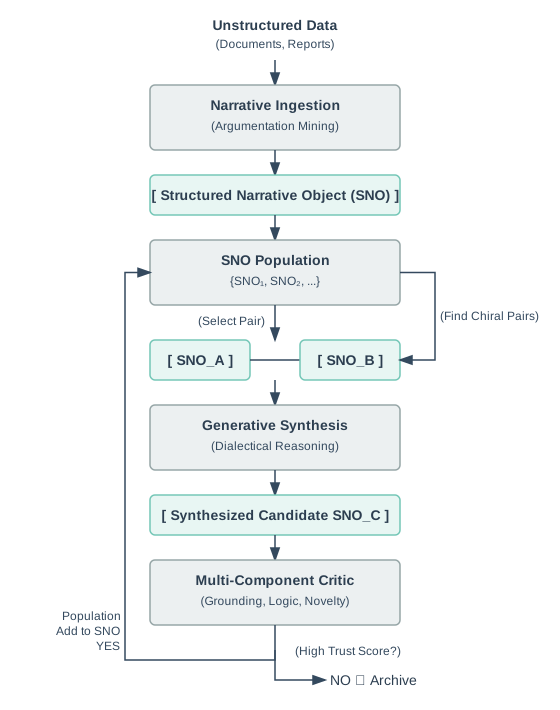
The key stages are:
- **Narrative Ingestion:** Unstructured text is converted into a formal
StructuredNarrativeObject(SNO). - **SNO Population:** The system maintains a collection of all known SNOs.
- **Chiral Pair Selection:** The system finds pairs of SNOs that are highly contradictory (
Chirality) and argue over the same evidence (Entanglement). - **Generative Synthesis:** The pair is passed to an LLM, which is prompted to perform dialectical reasoning and generate a new SNO that resolves the conflict.
- **Critic Evaluation:** The new SNO is rigorously evaluated by the critic pipeline. If its
Trust Scoreis high enough, it is added to the population.
Setting Up the CNS 2.0 Environment
**New to CNS 2.0?** If you haven’t completed Chapter 0: Quick Start, we highly recommend starting there. It will get you from zero to your first working SNO in 15 minutes. We will now establish the Python environment for our implementation. We’ll start with installation, then foundational data structures, and finally a centralized configuration class.
Installation Prerequisites
Before writing any code, you need to install the required dependencies. If you completed Chapter 0, you already have these installed. **Required Python version:** 3.9 or higher **Check your Python version:**
python --version # Should show 3.9.x or higher
**Install core dependencies:**
# If you haven't already, create and activate a virtual environment
python -m venv cns-env
source cns-env/bin/activate # Windows: cns-env\Scripts\activate
# Install required packages (~1.5GB download)
pip install --upgrade pip
pip install torch transformers sentence-transformers networkx numpy scikit-learn matplotlib
**Installation breakdown:**
torch(800MB): PyTorch for neural network operationstransformers(400MB): Hugging Face transformers librarysentence-transformers(50MB): Sentence embedding modelsnetworkx(5MB): Graph data structures for reasoning graphsnumpy(20MB): Numerical computingscikit-learn(30MB): Machine learning utilities (for t-SNE in Chapter 4)matplotlib(40MB): Visualization (for Chapter 4) **Verify installation:**
python -c "import torch; import transformers; import sentence\_transformers; import networkx; import numpy; print('✓ All imports successful')"
**Expected output:**
✓ All imports successful
**If you see import errors:**
- Check that your virtual environment is activated
- Rerun the
pip installcommand for the specific package - See Chapter 0 Troubleshooting for detailed help
Initializing the Embedding Model
Before defining data structures, let’s explicitly show how to initialize the embedding model that will be used throughout the system.
from sentence\_transformers import SentenceTransformer
import torch
# Check device availability (GPU vs CPU)
device = 'cuda' if torch.cuda.is\_available() else 'cpu'
print(f"Using device: {device}")
# Initialize the embedding model
# This downloads ~400MB on first run and caches locally
print("Loading embedding model 'all-MiniLM-L6-v2'...")
embedding\_model = SentenceTransformer('all-MiniLM-L6-v2', device=device)
print(f"✓ Model loaded on {device}")
# Test the model
test\_text = "This is a test hypothesis for CNS 2.0"
test\_embedding = embedding\_model.encode(test\_text)
print(f"✓ Test embedding shape: {test\_embedding.shape}") # Should be (384,)
print(f" First 5 dimensions: {test\_embedding[:5]}")
**Expected output:**
Using device: cpu
Loading embedding model 'all-MiniLM-L6-v2'...
✓ Model loaded on cpu
✓ Test embedding shape: (384,)
First 5 dimensions: [-0.0234 0.0891 -0.0456 0.1234 -0.0678]
**Why ‘all-MiniLM-L6-v2’?** This model provides an excellent balance:
- **Output dimension**: 384 (manageable for computation)
- **Performance**: 68.06 on semantic similarity benchmarks
- **Speed**: ~2,800 sentences/sec on CPU
- **Size**: 80MB model file, 400MB total download **Alternative models:**
all-mpnet-base-v2: Higher quality (69.57), slower, 768 dimsall-distilroberta-v1: Faster, slightly lower quality, 768 dims For production systems, you can cache the model to avoid repeated downloads:
# Save model locally
embedding\_model.save('models/embedding\_model')
# Later, load from disk (instant)
embedding\_model = SentenceTransformer('models/embedding\_model')
Foundational Data Structures
Now that we have our embedding model initialized, we can define the foundational data structures: RelationType and EvidenceItem. Using dataclasses ensures our code is readable, type-safe, and self-documenting.
# --- Standard Library Imports ---
from enum import Enum
from typing import Optional
from dataclasses import dataclass, field
import hashlib
class RelationType(Enum):
"""
Enumeration of logical relationship types in reasoning graphs.
Paper Reference: Section 2.1, Definition of Reasoning Graph G = (V, E\_G).
This enum represents the set of possible relationship types R for the
typed edges E\_G ⊆ V × V × R.
"""
SUPPORTS = "supports"
CONTRADICTS = "contradicts"
IMPLIES = "implies"
WEAKENS = "weakens"
EXPLAINS = "explains"
GENERALIZES = "generalizes"
@dataclass
class EvidenceItem:
"""
Represents a single piece of evidence, corresponding to an element e\_i
in the Evidence Set E from the paper. Includes source tracking and a
content hash for integrity.
Paper Reference: Section 2.1, Definition of Evidence Set E = {e\_1, e\_2, ..., e\_n}.
"""
content: str
source\_id: str # e.g., a DOI, URL, or document ID
doc\_hash: Optional[str] = None
confidence: float = 1.0
def \_\_post\_init\_\_(self):
"""
This is a special dataclass method that runs after the object is created.
We use it here to automatically generate a SHA256 hash of the evidence
content. This ensures that every piece of evidence has a unique, verifiable
fingerprint, which is crucial for tracking data provenance and ensuring
the integrity of the Evidence Set E.
"""
if self.doc\_hash is None:
self.doc\_hash = hashlib.sha256(self.content.encode()).hexdigest()[:16]
Core System Imports
Next, we set up the necessary imports. A research-grade implementation relies on semantic understanding, which requires powerful NLP libraries. We include a check to ensure these are installed, allowing the system to run in a simplified, data-structure-only mode if they are missing.
# --- Standard Library Imports ---
import json
from typing import Dict, List, Tuple, Set, Union
from abc import ABC, abstractmethod
# --- Core Scientific Computing and Graph Libraries ---
import numpy as np
import networkx as nx
# --- Machine Learning and NLP Libraries ---
# These are critical for the system's semantic capabilities.
try:
import torch
import transformers
from sentence\_transformers import SentenceTransformer
HAS\_TRANSFORMERS = True
except ImportError:
HAS\_TRANSFORMERS = False
print("WARNING: Key NLP/ML libraries (torch, transformers, sentence-transformers) not found.")
print("CNS 2.0 will run in a simplified, data-structure-only mode.")
print("The following components will NOT function:")
print("- SNO.compute\_hypothesis\_embedding()")
print("- GroundingCritic (requires NLI model)")
print("- NoveltyParsimonyCritic (requires embeddings)")
print("- ChiralPairDetector (requires embeddings)")
if HAS\_TRANSFORMERS:
print("NLP/ML libraries loaded successfully. Full functionality enabled.")
else:
print("Proceeding in simplified mode.")
System Configuration
A robust system requires a centralized place to manage key parameters. The CNSConfig class serves this purpose, directly mapping tunable parameters to concepts in the research proposal.
class CNSConfig:
"""
Configuration class for all CNS 2.0 system parameters.
Centralizing configuration makes the system easier to tune and manage. Each parameter
maps directly to a concept in the formal research proposal.
"""
def \_\_init\_\_(self):
# --- Embedding Model ---
# Paper Reference: Section 2.1, Hypothesis Embedding H ∈ R^d
# This parameter defines 'd', the dimension of the vectors used to represent
# text semantically. It MUST match the output dimension of the chosen
# sentence-transformer model.
# 'all-MiniLM-L6-v2' -> d=384
# 'all-mpnet-base-v2' -> d=768
self.embedding\_dim: int = 384
# --- Critic Pipeline Weights ---
# Paper Reference: Section 2.2, Equation 1: Reward(S) = Σ w\_i \* Score\_i(S)
# These are the weights 'w\_i' that define the system's "values." They control
# the balance between evidential support (grounding), logical coherence, and
# originality. Adjusting these weights allows for context-sensitive evaluation.
self.critic\_weights: Dict[str, float] = {
'grounding': 0.4,
'logic': 0.3,
'novelty': 0.3
}
# --- Novelty-Parsimony Critic Parameters ---
# Paper Reference: Section 2.2, Score\_N formula:
# Score\_N = α \* min\_i ||H - H\_i||₂ - β \* (|E\_G| / |V|)
# These are the 'α' and 'β' hyperparameters in the Novelty-Parsimony score.
self.novelty\_alpha: float = 0.7 # 'α': Scales the reward for novelty (distance from other SNOs).
self.novelty\_beta: float = 0.3 # 'β': Scales the penalty for complexity (graph size).
# --- Synthesis Trigger Thresholds ---
# Paper Reference: Section 3.2, "Synthesis Trigger"
# These thresholds act as a gatekeeper for the expensive synthesis process.
# An SNO pair is only considered for synthesis if BOTH its Chirality and
# Entanglement scores exceed these minimums. This is key to balancing
# the cost of synthesis with the potential for discovery.
self.synthesis\_thresholds: Dict[str, float] = {
'chirality': 0.7,
'entanglement': 0.5
}
# --- Model Identifiers ---
# These are the concrete HuggingFace model identifiers for the abstract
# components described in the paper.
self.models: Dict[str, str] = {
# Used to compute the Hypothesis Embedding 'H' (Section 2.1)
'embedding': "sentence-transformers/all-MiniLM-L6-v2",
# The Natural Language Inference model for the Grounding Critic (Section 2.2)
'nli': "roberta-large-mnli",
# The generative instruction-tuned model for the Synthesis Engine (Section 2.3)
'synthesis': "mistralai/Mistral-7B-Instruct-v0.1"
}
def to\_dict(self) -> Dict:
"""Convert configuration to a dictionary for easy serialization and logging."""
return {
'embedding\_dim': self.embedding\_dim,
'critic\_weights': self.critic\_weights,
'novelty\_alpha': self.novelty\_alpha,
'novelty\_beta': self.novelty\_beta,
'synthesis\_thresholds': self.synthesis\_thresholds,
'models': self.models
}
Initializing the Environment
Finally, we create a global configuration instance to be used throughout the system.
# Create a global configuration instance.
cns\_config = CNSConfig()
print("\nCNS 2.0 Foundation Environment Ready")
print("Current Configuration:")
print(json.dumps(cns\_config.to\_dict(), indent=2))
This enhanced setup provides a more rigorous and clearly annotated foundation, preparing you for the advanced implementations in the chapters to come.
✓ Chapter 1 Checkpoint
Before proceeding to Chapter 2, verify your environment is correctly configured.
Quick Verification Test
Save this as test\_chapter1.py:
"""
Chapter 1 Verification Test
Tests that all foundational components are working correctly.
"""
# Test 1: Verify all imports work
print("Test 1: Checking imports...")
try:
import json
from typing import Dict, List
import numpy as np
import networkx as nx
import torch
import transformers
from sentence\_transformers import SentenceTransformer
print("✓ All imports successful")
except ImportError as e:
print(f"✗ Import failed: {e}")
print(" → Rerun: pip install torch transformers sentence-transformers networkx numpy")
exit(1)
# Test 2: Verify foundational data structures
print("\nTest 2: Testing data structures...")
try:
from enum import Enum
from dataclasses import dataclass
from typing import Optional
import hashlib
class RelationType(Enum):
SUPPORTS = "supports"
CONTRADICTS = "contradicts"
@dataclass
class EvidenceItem:
content: str
source\_id: str
doc\_hash: Optional[str] = None
def \_\_post\_init\_\_(self):
if self.doc\_hash is None:
self.doc\_hash = hashlib.sha256(self.content.encode()).hexdigest()[:16]
# Create test evidence
evidence = EvidenceItem(
content="Test evidence content",
source\_id="test-001"
)
assert evidence.doc\_hash is not None
assert len(evidence.doc\_hash) == 16
print("✓ Data structures working")
except Exception as e:
print(f"✗ Data structure test failed: {e}")
exit(1)
# Test 3: Verify model can be loaded
print("\nTest 3: Testing embedding model...")
try:
print(" Loading model (this may take a moment)...")
model = SentenceTransformer('all-MiniLM-L6-v2')
test\_embedding = model.encode("Test sentence")
assert test\_embedding.shape == (384,), f"Expected shape (384,), got {test\_embedding.shape}"
print(f"✓ Embedding model working (shape: {test\_embedding.shape})")
except Exception as e:
print(f"✗ Model test failed: {e}")
print(" → Check internet connection or firewall settings")
exit(1)
# Test 4: Verify CNSConfig
print("\nTest 4: Testing configuration...")
try:
class CNSConfig:
def \_\_init\_\_(self):
self.embedding\_dim = 384
self.critic\_weights = {'grounding': 0.4, 'logic': 0.3, 'novelty': 0.3}
config = CNSConfig()
assert config.embedding\_dim == 384
assert sum(config.critic\_weights.values()) == 1.0
print("✓ Configuration working")
except Exception as e:
print(f"✗ Configuration test failed: {e}")
exit(1)
# All tests passed
print("\n" + "="\*60)
print("✓ ALL TESTS PASSED - Chapter 1 Complete!")
print("="\*60)
print("\nYou are ready to proceed to Chapter 2: SNO Foundations")
print("→ /guides/building-cns-2.0-developers-guide/chapter-2-sno-foundations/")
Run the verification:
python test\_chapter1.py
Expected Output:
Test 1: Checking imports...
✓ All imports successful
Test 2: Testing data structures...
✓ Data structures working
Test 3: Testing embedding model...
Loading model (this may take a moment)...
✓ Embedding model working (shape: (384,))
Test 4: Testing configuration...
✓ Configuration working
============================================================
✓ ALL TESTS PASSED - Chapter 1 Complete!
============================================================
You are ready to proceed to Chapter 2: SNO Foundations
→ /guides/building-cns-2.0-developers-guide/chapter-2-sno-foundations/
If Tests Fail:
**Import errors:**
- Ensure virtual environment is activated
- Rerun:
pip install torch transformers sentence-transformers networkx numpy**Model download fails:** - Check internet connection
- Check firewall allows
huggingface.co - Try:
rm -rf ~/.cache/huggingface/then rerun **Other errors:** - See Chapter 0 Troubleshooting
- Post in GitHub Discussions with error details
Navigation
**← Previous:** Chapter 0: Quick Start **→ Next:** Chapter 2: SNO Foundations